NICE ROBUS – how to connect a switch (video doorbell, intercom) to the operator
The home video doorbell/intercom is connected to the NICE Robus operator using a voltage-free contact to the SBS input (on older control units, it is marked P.P.)
After connecting to this input, you need to run the “Learning connected operator devices” procedure on the Robus. Procedure:
Learning connected operator devices
After connecting, disconnecting, or changing the wiring of additional devices on the BlueBUS inputs and STOP the additional devices must be learned learning phase. The operator will alert you that this procedure needs to be carried out by flashing LEDs L1 and L2.
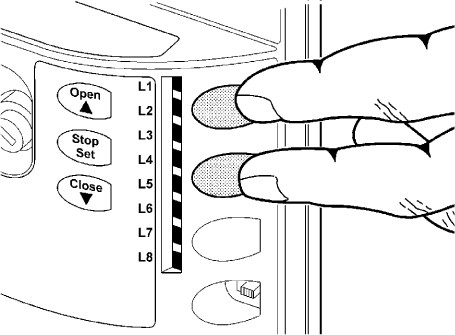
- Press the “Open” and “Stop/SetAs soon as they start flashing rapidly
- As soon as they start flashing rapidly, L1 and L2, release the buttons
- Wait a few seconds until the control unit finishes the device learning process.
- If everything went smoothly, the STOP LED should be lit and L1 and L2 should be off. Alternatively, L3 and L4, may start flashing if you have not yet completed the leaf length learning phase.

